The brief I gave it
Service firms struggle to show what they do. A paragraph on a services page asks visitors to picture the outcome, while a short video shows it. I wanted one for my own site, so I used the affiliate key Picturesque sent me and built it there.
I had a clear picture. A 60-second explainer in my brand colours, a warm light gray #F5F5F7 background, heavy navy #0B3558 type, Figtree font, frosted white motion UI. One reference video to set the pacing. A script that opens with the line about models no longer being the hard part. My 3D mascot Osi, small in the frame.
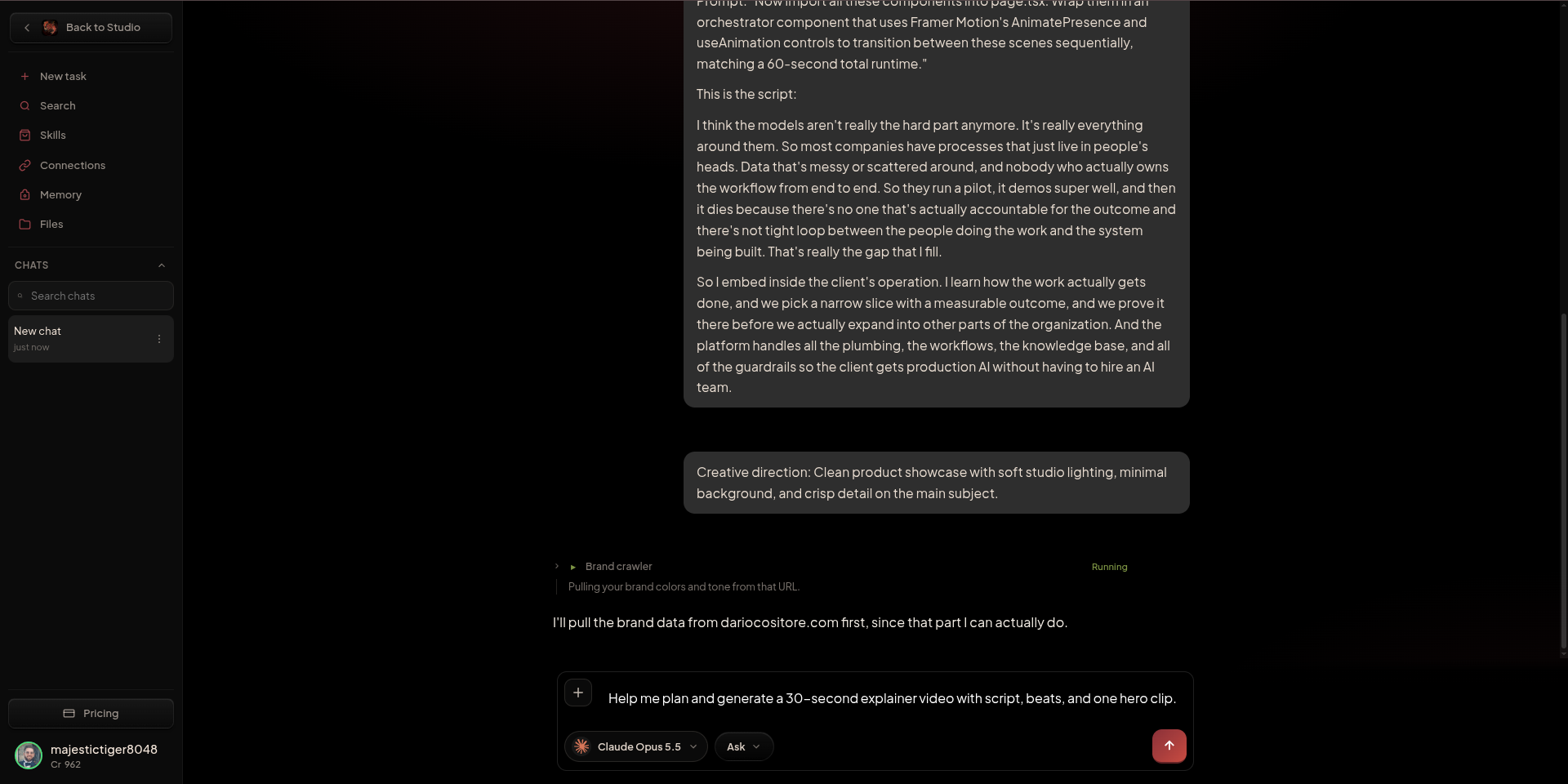
I wrote one very long prompt. It asked Director to read my site, pull the design tokens, rebuild the reference as a React and Framer Motion sequence in four phases, then orchestrate the scenes into a 60-second runtime. This is the prompt I sent.
Prompt sent to Director
Analyze the HTML, CSS, and general styling of https://dariocositore.com/. Extract the exact primary brand colors, background hex codes, typography (font families), and border-radius styles. Update tailwind.config.ts and globals.css with these specific design tokens so all subsequent components match my personal branding perfectly.
I have added a video of a target video to the /reference folder. I want to build a 1:1 interactive web replica of this flow using React and Framer Motion, but styled entirely with the brand tokens you just extracted.
Phase 1. Build the opening sequence. Animate the text "The models aren't really the hard part anymore." fading in, then dimming the word "anymore". Use my brand's primary font and text colors.
Phase 2. Create the pulsing network diagram expanding from the central node to Chat, CRM, Workflows. Use Framer Motion to draw the connecting SVG lines. Style the nodes with my surface colors and accent colors for the glowing dots.
Phase 3. Build the AI Pilot dashboard shown in the reference images. Include the line chart, throughput metrics, and activity feed. Replace the dark mode styling with a theme that matches my website's background and container styles.
Phase 4. Build the final horizontal onboarding sequence, Discovery, One Workflow, Knowledge, Sample, Iterate, Scale, with the glowing progress line. Replace the final logo with my logo from dariocositore.com.
Now import all these components into page.tsx. Wrap them in an orchestrator component that uses Framer Motion's AnimatePresence and useAnimation controls to transition between these scenes sequentially, matching a 60-second total runtime.
What Director told me
I clicked Director first. The name suggests a tool that runs the whole production for you. What I got was /director/chat, a familiar chat box with Opus on the other end and a row of skills to pick from. It turned out to be a good planning partner before spending credits on generation.
I had 1,000 credits. One message later I had 962. Those 38 credits were well spent, because the reply set the boundaries clearly.
Director's reply
Hi Dario. Before the list, an update on your last request, because some of it isn't possible here.
What I could and couldn't do with the site build:
I read your site and saved its colours to your brand memory: #F5F5F7 for backgrounds, #EBF1F8 and #E2E8F0 for panels and borders, #334155 for main text and #475569 for secondary text.
I didn't get your fonts, corner rounding or an accent colour. I don't want to guess those and call them exact. If you send me your font name and accent colour (or a screenshot), I'll use them.
I can't open or edit files on your computer, like tailwind.config.ts, globals.css, page.tsx or your /reference folder. Your video also didn't come through in this chat, so I haven't seen it. You can attach it or key frames from it here.
What I can do for this project:
Build the 60-second animated sequence as a standalone web page. It would have your four scenes: the intro line, the node diagram, the AI Pilot dashboard and the timeline. I'd style it with your palette and give you a shareable preview link or a zip download. It's plain HTML, CSS and JS, not a React/Framer Motion project, but you or a developer could use it as the visual spec.
Turn it into a real video. I'd make a short clip for each scene and add a voiceover reading your script. It could be 16:9 for your site and LinkedIn, or 9:16 for Reels.
Make stills for each scene: the dashboard, node diagram, timeline and title cards, styled like your site with soft studio light, plenty of empty space and crisp detail. You could also use these as design mockups when you build the React version.
Make more marketing content around it: LinkedIn and Instagram carousels, thumbnails and short clips cut from the script. I can post them now or schedule them to your connected accounts, including on a regular schedule.
For your 60 seconds, I'd suggest seven beats:
0-8s: The models aren't really the hard part anymore.
8-20s: why pilots fail
20-26s: That's the gap I fill
26-36s: the node diagram
36-46s: the dashboard
46-56s: the timeline
56-60s: your logo
Which do you want first?
The interactive web page (1)
The voiced video (2)
Both: the stills first, then I animate them into the video
Two details mattered. It read my site and kept the exact hex codes, which locked the palette in. It could not see the reference video or edit local files, so I moved the planning work into the prompt and attached the references in the generation step.
The seven-beat structure gave the whole piece a spine. Here is how it maps to the runtime.
Choosing a model
Picturesque puts a deep list of models behind one wallet. SeeDance 2 and 2.5, Kling 2.6 and 3.0, Veo 3.1, Grok Imagine, Motion Control. I got a little overwhelmed, so I did what I usually do and researched.
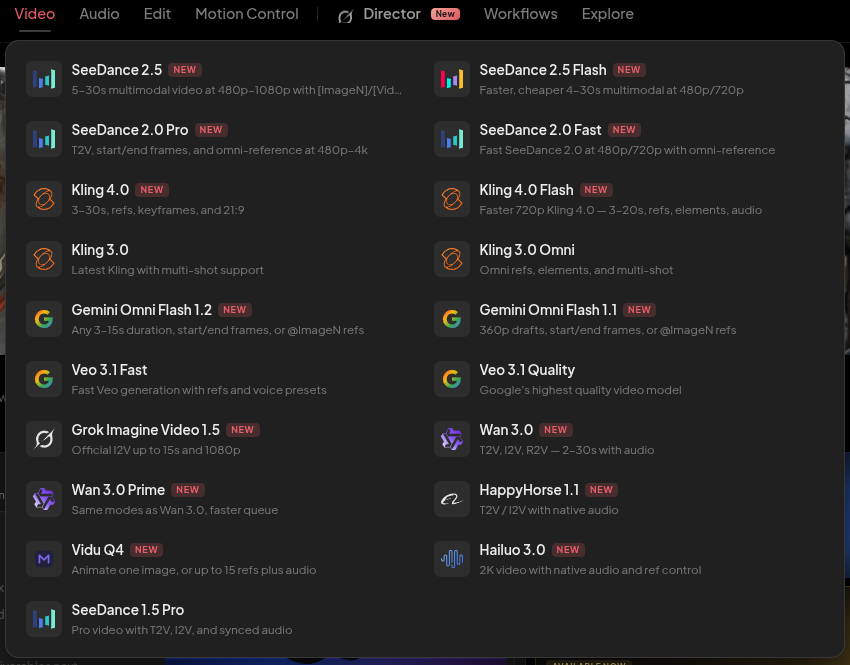
I started with Kling 4.0 because the model card promised refs, elements and 30-second clips. After more reading I moved to SeeDance 2.5 for the motion style I wanted. Both are strong choices. SeeDance fit this brief better.
Motion Control is worth knowing about as well. At about 2 credits per five seconds, it gives you room to test structure before you spend on a final render.
Elements and references
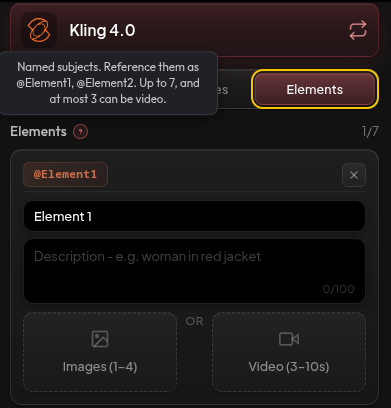
The Elements feature lets you name subjects as @Element1, @Element2 and so on. Up to seven, with three allowed to be video. Each gets a 100-character description. Multi scene gives each shot its own prompt inside one clip, with the total between 3 and 30 seconds. You can attach up to ten reference images.
Named subjects are the trick for brand characters. I gave Osi a short description, kept him small in frame, and the model held him steady across the motion.
I asked Gemini 3.1 Pro to turn my brief into a prompt the generation model could follow. A video model will not research your website on its own. That job belongs to a text model, and doing it first makes the generation prompt much shorter.
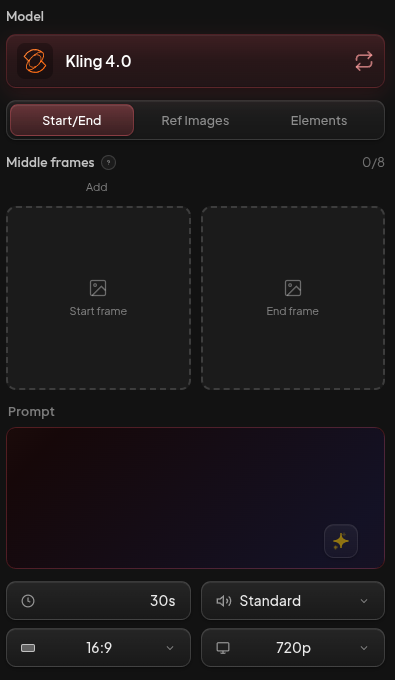
The prompt I submitted
I fed it the brand colours, a motion reference, the UI reference, the mascot as a small background element, and the script. Ultra long prompts were not the win here. Good references were.
Generation prompt
A single 30-second abstract SaaS motion graphic using [Video1] for structural motion guidance. The visual style must strictly use a warm light gray (#F5F5F7) background, heavy navy blue (#0B3558) typography, and frosted white glass animated motion UI elements. Figtree font for text animated text. Follow [Video1] even for text motion reference and for UI motion reference. [Osi] is our mascotte not a hero, add it somewhere but small almost hidden, branding purposes. The video should be centered to Motion UI and be an explainer following the script below.
Script
The models aren't the hard part anymore, it's everything around them: Messy data, disconnected workflows, and failed pilots.
That's the gap I fill.
I embed in your operation and pick one narrow, high-volume workflow with a measurable outcome. We build the agent's knowledge base first, test it on a small sample, iterate with your operators, and then scale.
That's how you get from vague AI ambition to real value in weeks.
What came back
SeeDance 2.5 gave me a 10-second clip at 1080p, with the exact cost shown before I hit Generate. The motion followed the reference closely. The mascot animation was the highlight: Osi moved with weight and personality, the kind of detail that makes a brand memorable.
The generated text needed a design pass, so I keep title cards in the browser and let the model handle the motion. That split gave me the best result from the run.
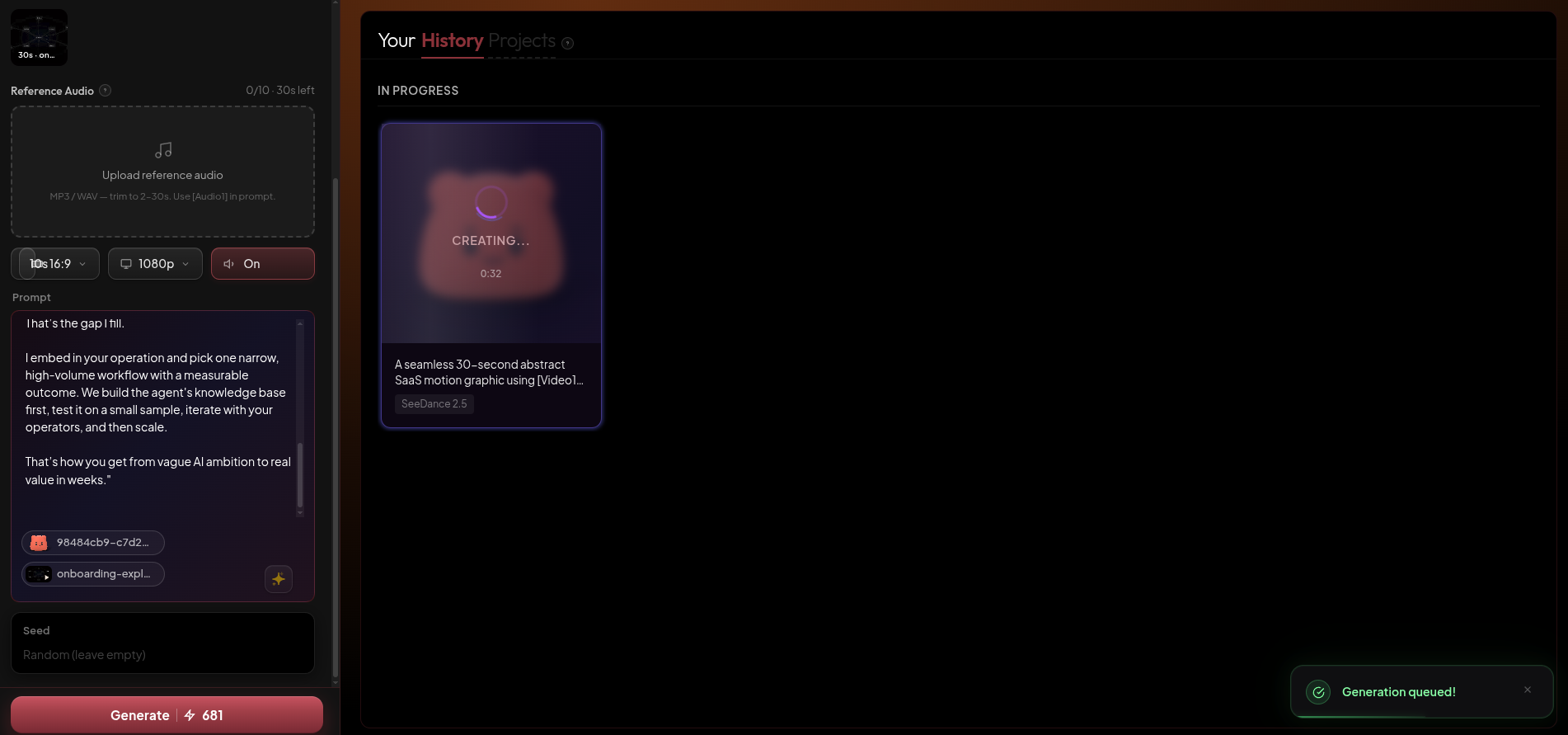
The clip from that run is below.
What it costs
A good 30-second explainer here runs around 1,200 to 1,300 credits. Knowing that up front changes which plan makes sense.
| Plan | Price | Credits a month | What it covers |
|---|---|---|---|
| Free | $0 | 15 a day | Testing a model and learning the interface |
| Basic | $9/mo | 900 | Stills and short motion clips |
| Pro | $29/mo | 3,500 | Two or three 30-second explainers |
| Ultimate | $65/mo | 8,000 | Six explainers, a good fit for most agencies |
| Creator | $189/mo | 24,000 | Around eighteen, for studios publishing weekly |
Extra re-generations were not the answer for me. What moved the needle was a sharp reference that showed the exact motion I wanted. Bring the reference, keep the prompt tight, and pick the plan that covers the output.
How a service firm can use this
Agencies and consultancies have the problem I had. The work is invisible until someone explains it. Most firms settle for a slide deck and a paragraph on the services page.
You can make a short explainer without a camera crew. Pick one offer. Write a script that names the problem and the outcome. Gather references for motion, UI, palette and character. Put them in one generation and export.
Use the clip on the services page, at the top of a LinkedIn post, in a proposal, or as the opener in a sales sequence. The firms that win are the ones that make the work visible before the first call.
Who should start small
If you produce one video a year, the free tier is a good place to begin. Fifteen credits a day covers a test and a little more.
For frame-accurate typography, keep title cards in a design tool and let the model handle the motion. That division of labour made the whole run smoother.
FAQ
How many credits does a 30-second explainer cost on Picturesque AI?
Around 1,200 to 1,300 credits at the quality I was aiming for. SeeDance 2.5 at 720p runs about 156 credits for five seconds, so a higher plan pays for itself after a couple of runs.
What is the Director feature in Picturesque AI?
A chat window with selectable skills. It reads your website and keeps the brand colours. It cannot edit local files, so the reference material goes into the generation step. The reply is worth the credits because it sets the boundaries early.
Can a video model follow my brand colours exactly?
The background and text colours came through close to the source. Fonts and corner rounding need a design pass, so I keep title cards in the browser and let the model handle motion.
Is it worth it for agencies?
For a short service explainer, yes. One offer, one script, four references, and one generation gives you a clip for the services page, a proposal, or LinkedIn.
Which plan should I pick?
Free gives you 15 credits a day for testing. Basic at $9 covers stills and short clips. Pro at $29 covers two or three 30-second explainers. Ultimate at $65 covers six, and Creator at $189 covers around eighteen.
The verdict
Picturesque brought a lot of models under one wallet, and the credit panel tells you the cost before you run. Director is a useful planning partner when you treat it as a chat with skills. A higher plan pays for itself once you know a good 30-second explainer costs around 1,200 credits.
I am happy with the clip I got and with the mascot animation in particular. I will go back with a cleaner reference and a plan that covers a few runs. If you sell professional services, the same recipe is available to you.
Try it through my affiliate link. I earn a commission if you subscribe, and the comparison above stays the same either way.